dired-quick-sort: Sort Dired Buffers Quickly in Emacs

Last updated on December 10, 2016

While Dired is great for browsing the file system, it is often annoying that the buffer is not sorted in the way we want to see. While Dired provides the flexible customizing variable dired-listing-switches, it is still not convenient to switch between different sorting criteria quickly. For this reason, I created the Emacs extension dired-quick-sort to make sorting Dired an easy story.

Project Homepage

Screenshot

3 Common Misconceptions about Data Backup

Last updated on November 23, 2018

Backup is undoubtedly important for most people with digital data. However, individuals often risk data loss by using dangerous strategies. Here, I will show a few false (and dangerous) notions that people often hold for their data backup.

“External Hard Drives are Enough for Backup”

While you may be well aware of the possibility of external hard drive breaking down and make backups on multiple external hard drives, but it is certainly not enough. Usually, when you make backup on external hard drives or optical discs, you typically store them in your home or in the office. But some extreme situations can happen: fire, theft, earthquake, or some magnets that break all the drives. It is usually considered much safer to make remote backup along with these external drives. To make remote backup, you can either use a simple method such as uploading files to cloud storage websites like Dropbox or OneDrive, or use a more sophisticated approach to make frequent backup easier: use incremental backup software such as Areca Backup or Back In Time along with a backup virtual private server (VPS) such as Backupsy and Time4VPS.

“File Synchronization Software is a Reliable Backup Tool”

Many people heavily rely on file synchronization software such as Dropbox, Google Drive, Bit Torrent Sync, Syncthing, etc. to back up. I would say they aren't really reliable: the data can be lost forever in many circumstances. For example, a software bug, or a corruption of your local disk, may well affect the remote copy that you may even not know for a long time. While you can still use these software as convenient “backup” tools, my recommendation is to make sure you make snapshots: you can always go back if you found a certain file is corrupted. In order for it to be easier to make snapshots, you may wanna try some incremental backup software such as Areca Backup on Windows, Time Machine on Mac OS X or Back In Time on GNU/Linux.

“No Need to Back up Things on the Internet”

Anything on the Internet may disappear someday—even this blog post you are reading. People remove articles, videos and other contents on the Internet all the time for various reasons: commercial purpose (e.g., free contents become paid), copyright infringement, or the content owner simply goes bankrupted. If you really don't want to lose access to some Internet contents, you probably want to make a local copy and make proper backup copies. For example, for YouTube videos, you can download them via sites like savefrom.net or a software like youtube-dl; for an article, you can save the web page as a PDF file; for an image, you can save them to your local disk by right clicking them in your browser.

Security Checks to Do Before Installing an Android App

Last updated on August 21, 2016

Android is one of the most popular mobile operating systems. However, some Android apps can cause security issues if not carefully handled. They can be badly written which leaves a lot of security holes for intruders, or itself acts like a malware/virus. Therefore, before installing an Android app, one need to do some checks to make sure it won't cause security issues.

Continue reading

Manage Passwords for Multiple Accounts with Checksums

Last updated on May 27, 2018

It is often hard to manage different passwords across many accounts: Complicated passwords, including handcrafted ones and those generated by a random password generator, are hard to memorize, but simple passwords are often not safe. A cloud password manager such as LastPass is not a safe option either: cloud password managers often suffer from various security issues. Besides that, it is not cool to expose your passwords to a cloud password manager company. With checksums, the management can be easily done by ourselves, while still maintaining “good” passwords.

Checksums are small-size strings which can be computed from other strings by specific checksum algorithms. Using the most popular checksum algorithms, such as MD5, SHA-1, etc. the checksums usually look very different from the original string, and changing even a single bit of the original string usually leads to very different checksums. For example, the MD5 checksums of the two similar words “bird” and “birds” are completely different (you can use this website to compute the checksum of a string, or use the md5sum or sha1sum command line utility if you are on GNU/Linux or Max OS X):

string MD5 checksum
bird 87d28160e9215b17645c734ba7170ba1
birds ea5f5a5293a7d404e091c04939ba2ad8

Here the basic strategy to manage passwords is to have the password for each account to follow the “prefix+checksum” scheme. The prefix is the same across all accounts and is similar to the usual passwords, e.g., it can be one of your current passwords — this is what you need to memorize. The checksum part is unique for each account: it can be part of the MD5/SHA-1/SHA-2 checksum of something related to the host, such as the domain of the website, or the name of the company which hosts the account, etc. In this way, only one global prefix is needed to memorize which brings easy management, and the checksum part of each account is unique which brings security. For example, as shown in the figure below, for your account at quitter.se, you can use the MD5 checksum of the string “quitter.se”, which is 00b34f415b15dbea2e9d0611d2cc90f8. Then, with a prefix such as my-password, follow the “prefix+checksum” scheme, the password for quitter.se would be my-password00b34f415b15dbea2e9d0611d2cc90f8. If only part of the checksum is used, e.g., the first 10 characters of the checksum, then the password is my-password00b34f415b.

The “prefix+checksum” scheme.

A Collection of Issues about the LaTeX Output in Sphinx and the Solutions

Last updated on October 1, 2016

Sphinx is a powerful documentation generation tool, as well as a powerful book writing tool. It can generate multiple output formats, including LaTeX for printable PDF versions. However, the LaTeX output is often more problematic than the html output. In this post, a collection of common issues and their solutions are listed.

Continue reading

Configure Proxy Using PAC Files on Firefox for Android

Last updated on August 21, 2016

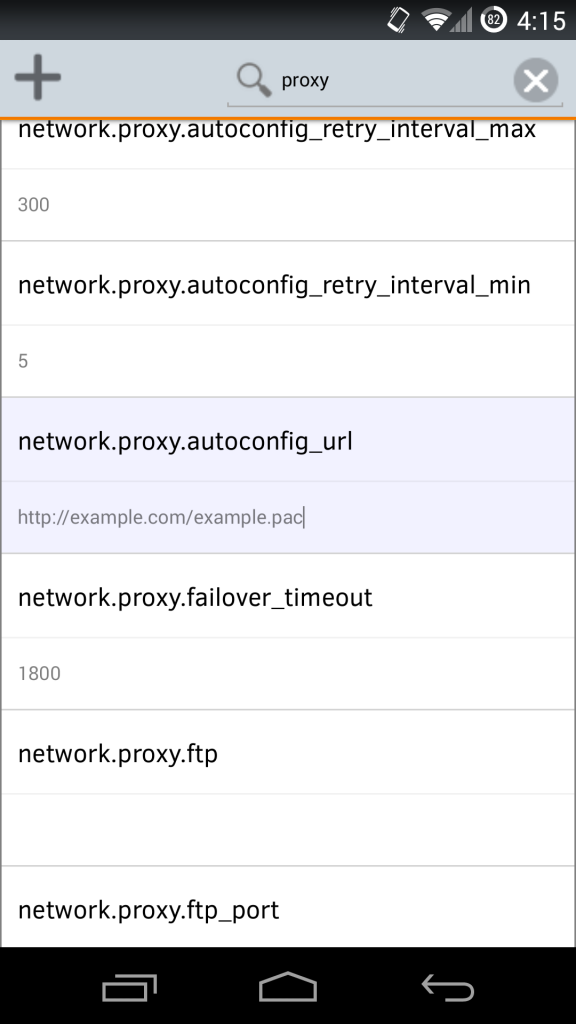
Firefox for Android does not provide a UI option for users to to configure Firefox to use PAC file for proxy settings, but we can use the about:config page to achieve this goal.

Type about:config into your Firefox address bar, and you’ll see a list of options below. In the search box, type proxy to list all options related to proxy. There are two notable options listed here: network.proxy.type and network.proxy.autoconfig_url. Change network.proxy.type to 2 and network.proxy.autoconfig_url to the URL of the PAC file (Tap on the edit box below the configuration option twice to start edit the option). Close the about:config page and now Firefox should use the PAC file for proxy.

To configure the proxy of Firefox on Android using a given proxy server and port, please see this article.

Control the LED on a USB WiFi Adapter on Linux

Last updated on October 11, 2018

First, find the corresponding directory of this LED device in /sys/class/leds, such as /sys/class/leds/device_name, and switch your working directory to this directory. The device_name may be similar to the device driver of your wifi adapter. You should have a file named trigger and a file named brightness in this directory. cat trigger shows you available triggers to trigger the LED light, with the current trigger surrounded by brackets. Different triggers will turn on and off the LED in different cases. Use echo new-trigger > trigger to change trigger. cat brightness shows the current brightness of the LED. Use echo N > brightness to change brightness, where N is an integer.

Continue reading